
How to Build a Knowledge Base for a Merch Drop Before Launch Day
Sep 29, 202617 min read
A customer finds your new merch drop, loves the design, picks their size, and is ready to place an order. Then they pause. They cannot quickly find out how long shipping will take or whether their location is covered. It is a small question, but at the point of purchase, even a missing detail can create hesitation.
That becomes even more important during a merch drop, when customer questions can quickly increase. People may want to know about product details and sizing, shipping timelines, returns, payment options, stock availability, or the status of an order. When the same questions keep coming in, your team can end up spending valuable time repeating information instead of handling more important launch tasks.
This is where a Knowledge Base becomes important. SentLogic's LogI use the information you provide about your products, policies, pricing, shipping, and other store details to give LogI the business context it needs when answering customer questions.
A well-prepared Knowledge Base becomes especially useful when demand increases and customer conversations start coming in at a higher volume. Having the right information ready before launch helps LogI respond with answers that are consistent with your products and policies, while giving your team a stronger foundation for handling the rush.
That becomes even more important during a merch drop, when customer questions can quickly increase. People may want to know about product details and sizing, shipping timelines, returns, payment options, stock availability, or the status of an order. When the same questions keep coming in, your team can end up spending valuable time repeating information instead of handling more important launch tasks.
This is where a Knowledge Base becomes important. SentLogic's LogI use the information you provide about your products, policies, pricing, shipping, and other store details to give LogI the business context it needs when answering customer questions.
A well-prepared Knowledge Base becomes especially useful when demand increases and customer conversations start coming in at a higher volume. Having the right information ready before launch helps LogI respond with answers that are consistent with your products and policies, while giving your team a stronger foundation for handling the rush.
What Information Does Your Knowledge Base Need Before a Merch Drop?
Before your merch drop goes live, your Knowledge Base should have all the information that LogI may need to answer customer questions. Think of it as putting everything about the drop in one place, so LogI does not have to guess when customers start asking questions.
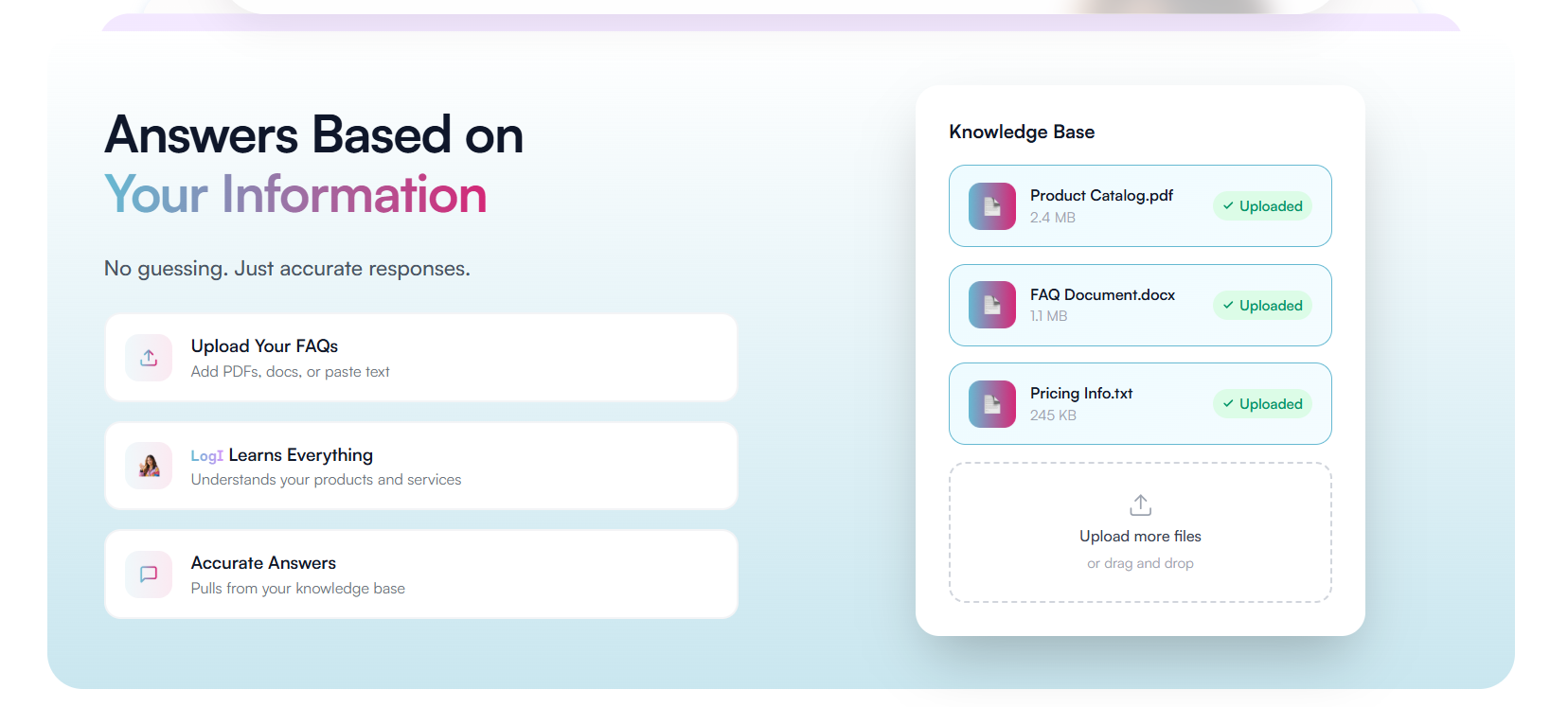
Start with the basic information about every product included in the merch drop. This gives LogI a clear understanding of what is being sold and helps it answer common product questions without sending every customer to your team.
Product Details and Pricing
For each product, include the basic details a customer would want to know. This can include
- Product name and description
- Material and key product details
- Available sizes and fit information
- Colors and variants
- Care instructions, if relevant
- Product availability or stock information
Launch Details and Drop Information
Your Knowledge Base should also explain how the merch drop works, not just what products are being sold, by including details such as
- Launch date and time
- Time zone for the launch
- Whether the drop is available for a limited time
- Purchase limits, if any
- Preorder information, if applicable
- Limited quantities or until inventory is depleted
- Any other rules customers should know before purchasing
This is especially important for a limited merch drop. If a product is only available for a short period or in limited quantities, LogI needs that information to understand the context of customer questions about availability and timing.
It is also worth preparing this information in stages rather than waiting until launch day. A week or more before the drop, focus on the information that is unlikely to change, such as product details, pricing, sizing, shipping, returns, and payment information. Then, in the final 24 to 48 hours, review time-sensitive details such as launch timing, available quantities, promotions, shipping cutoffs, and any last-minute product or policy changes. This gives you time to check that the latest information is ready before the drop goes live.
Shipping and Fulfillment Information
Shipping questions are common during a launch, so make sure these details are included before the drop begins.
Your Knowledge Base can include
- Where you ship
- Shipping rates
- Available delivery options or couriers
- Processing and estimated delivery times
- Any launch-specific shipping information or cutoffs
Returns, Exchanges, and Cancellations
Customers may also want to know what happens if they change their mind after placing an order. Add your return, exchange, and cancellation policies to the Knowledge Base before launch.
Make sure to include any merch drop-specific rules as well.
- Whether limited edition products can be returned or exchanged
- Cancellation conditions
- Any launch-specific restrictions
- Exceptions that customers should be aware of
Payment and Order Information
Finally, add the information customers may need once they are ready to purchase with details like
- Accepted payment methods
- Any payment restrictions
- Order confirmation information
- Order processing details
- Tracking or post-purchase information
- Common payment- or order-related questions
This gives LogI useful context across the customer journey, from the first product question to what happens after an order is placed.
What Makes This Merch Drop Different?
Along with your regular store information, think about what makes this particular merch drop different.
Maybe it is a limited collection, exclusive release, collaboration, fixed launch window, or a product with limited quantities. Whatever makes the drop different should be reflected in the Knowledge Base.
This temporary launch information gives LogI the context it needs to understand why a product may be unavailable, when customers can purchase it, and what conditions apply to the drop.
A simple rule to follow is this: if customers are likely to ask about something during the merch drop, make sure the answer is already covered in your Knowledge Base.
How Do You Upload Your Knowledge Base in LogI Studio?
Before uploading your merch drop information, it helps to understand where the Knowledge Base fits within LogI. LogI is the AI agent that handles customer conversations, while LogI Studio is where you configure LogI and provide the information it needs through the Knowledge Base tab.
Once your merch drop information is ready, you can add it to the Knowledge Base in LogI Studio. The process is straightforward, but the quality of the information you provide matters. Your documents should give LogI the context it needs to answer questions about your products, policies, and upcoming drop.
Step 1: Open the Knowledge Base Tab.
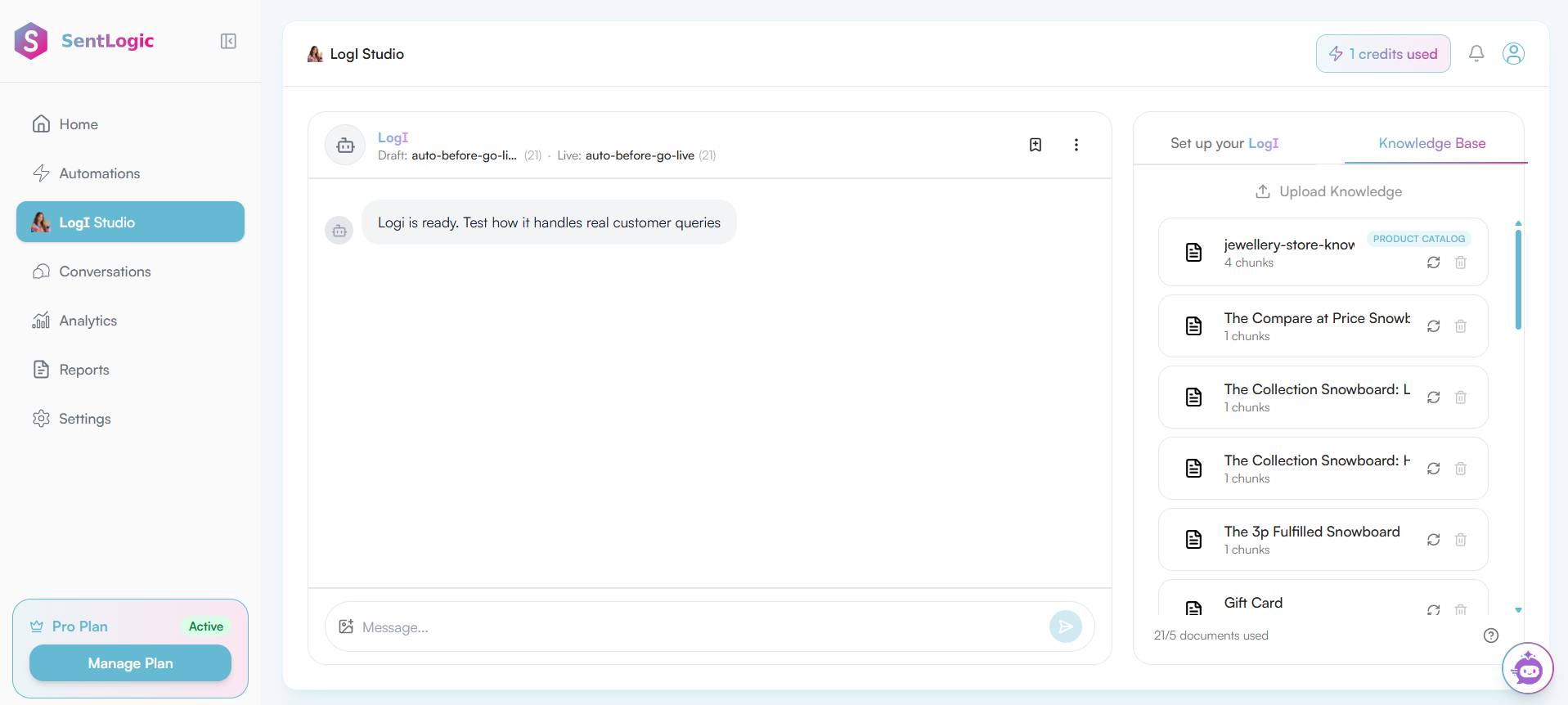
Start by opening LogI Studio and navigating to the Knowledge Base tab. This is where you can upload the business information LogI can use when responding to customers.
For a merch drop, this is where you can bring together the information customers are most likely to need before making a purchase, from product details and pricing to shipping and store policies.
Step 2: Upload Your Documents
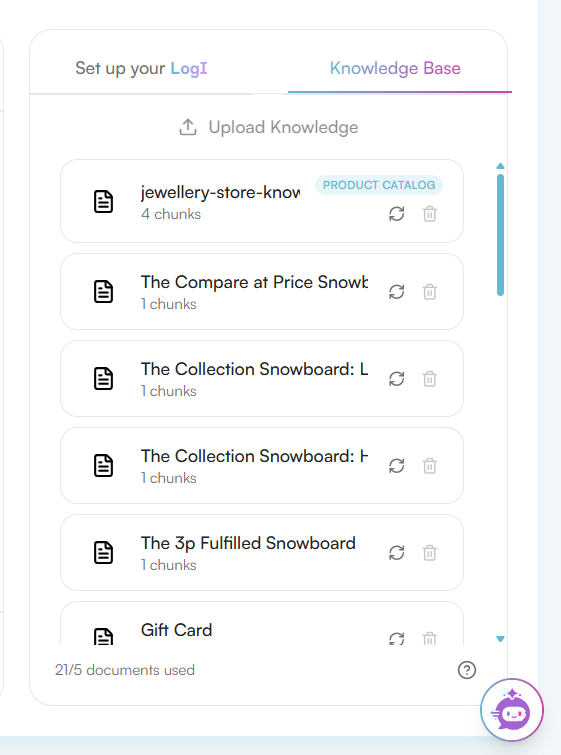
Once you are in the Knowledge Base section, select the Upload option and add the documents prepared for your merch drop. Instead of keeping important information scattered across different files, you can bring the relevant business information together in one place.
Your documents can cover areas such as product information, frequently asked questions, pricing, shipping, returns, exchanges, payments, and other store policies. The goal is to give LogI a clear source of business information it can refer to when handling customer conversations.
Step 3: Add Relevant Merch Drop Information
The documents should contain the information that is relevant to both your store and the specific merch drop. This includes the details that are likely to come up in customer conversations once the drop goes live.
For example, a Product Catalog PDF can bring together product names, descriptions, prices, sizes, colors, variants, and availability. This gives LogI the product context it needs when customers ask questions about what is being released.
An FAQ document can cover questions around shipping, returns, exchanges, payments, order processing, and other store policies. Having these details available means the Knowledge Base is not limited to product information but also covers the practical questions customers may have before or after placing an order.
The file types you can upload depend on the options available in the Knowledge Base. For now, PDF files uploaded to the Knowledge Base should be less than 10 MB.
Step 4: Set Up Your LogI
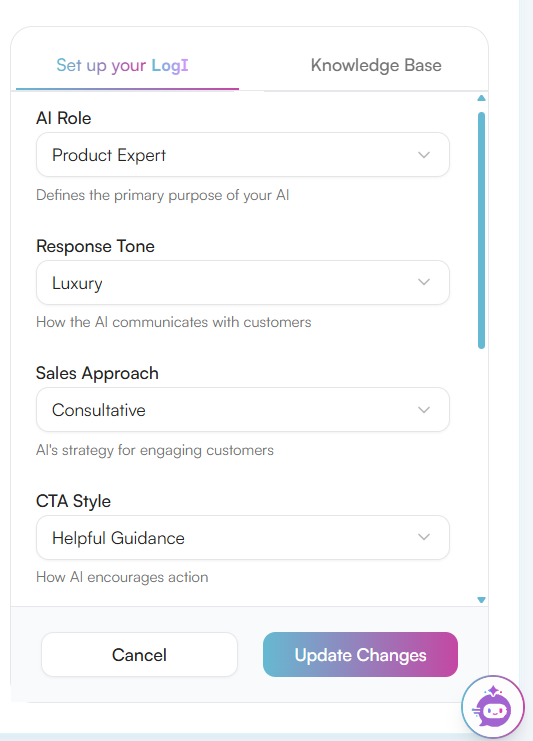
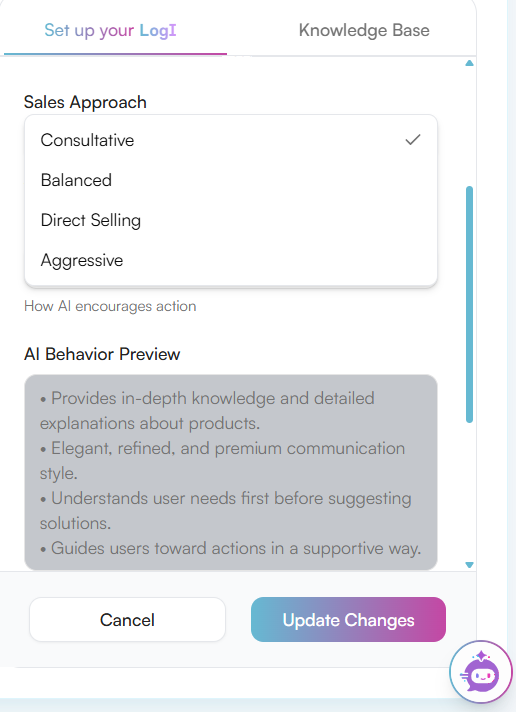
Once your Knowledge Base is ready, move to the Set Up Your LogI section in LogI Studio. This is where you decide how LogI should interact with customers and how it should handle different types of conversations.
- AI Role: Choose whether LogI should act as a Product Expert, Support Agent, or Sales Assistant.
- Response Tone: Set how LogI should communicate with customers, with options such as Friendly, Professional, Luxury, or Sales Focused.
- Sales Approach: Choose how LogI should handle purchase-related conversations with options such as Balanced, Direct Selling, or Aggressive.
- CTA Style: Choose how LogI should guide customers toward the next step, such as through Helpful Guidance, Soft Suggestion, or Direct CTA.
- Custom Instruction: Add any additional guidance for LogI, such as using a softer sales pitch or following a specific communication preference.
These settings work alongside the Knowledge Base. The Knowledge Base gives LogI the information it needs, while the setup options determine how LogI uses and communicates that information during customer conversations.
Step 5: Save Your Knowledge Base and Setup
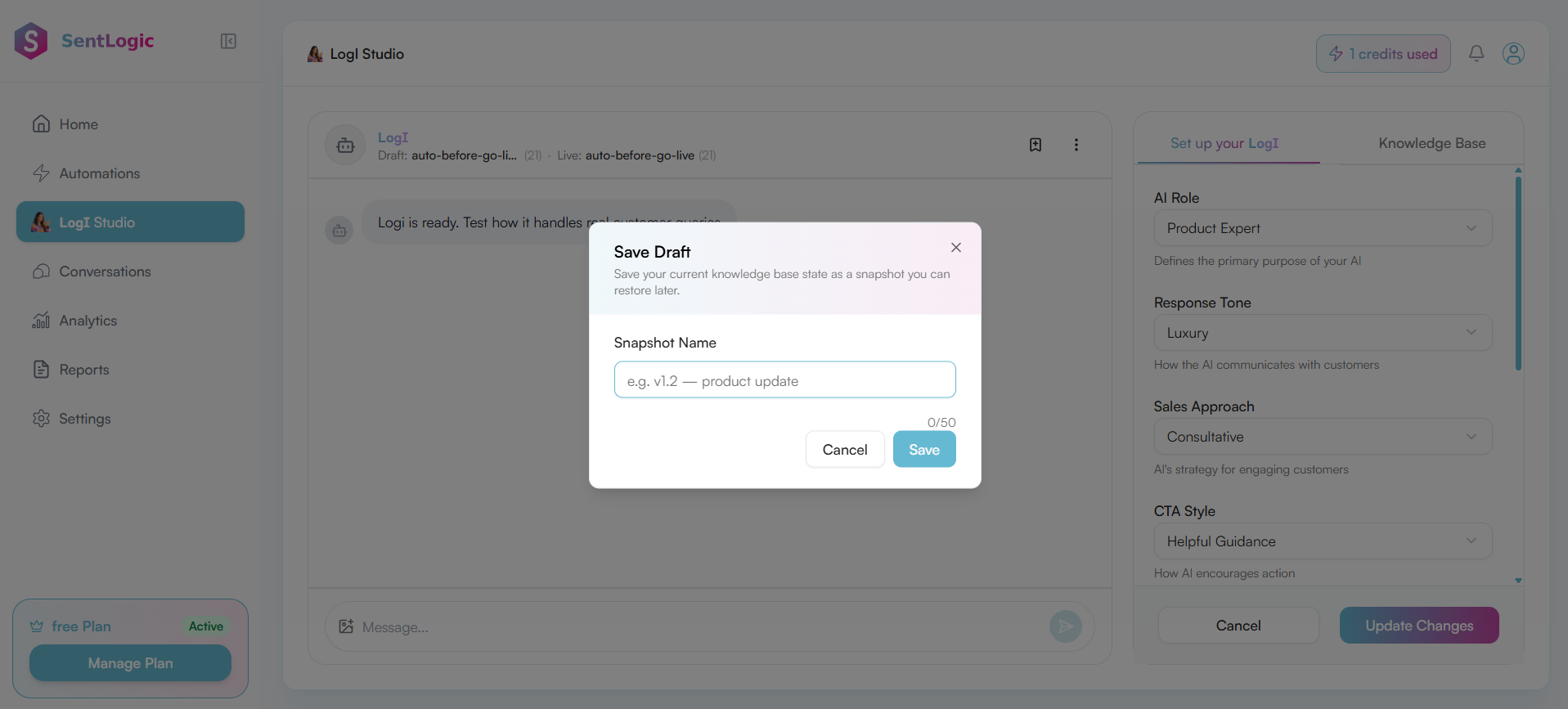
Once your documents and LogI settings are ready, you can save your current work using the + option. Clicking the + icon opens the Save Draft window, where you can enter a snapshot name for your current Knowledge Base state and save it. This allows you to keep a saved version that you can restore later.
The saved setup can also be useful when checking how LogI responds based on the information and settings you have provided. Before your merch drop goes live, reviewing the Knowledge Base together with your LogI setup gives you a chance to make sure the right information is available and that LogI is communicating it in the way you want.
The Knowledge Base acts as the information foundation behind LogI's customer conversations, while the LogI setup determines its role, tone, sales approach, CTA style, and any additional instructions.
Outdated Knowledge Base and Its Impact on LogI DMs
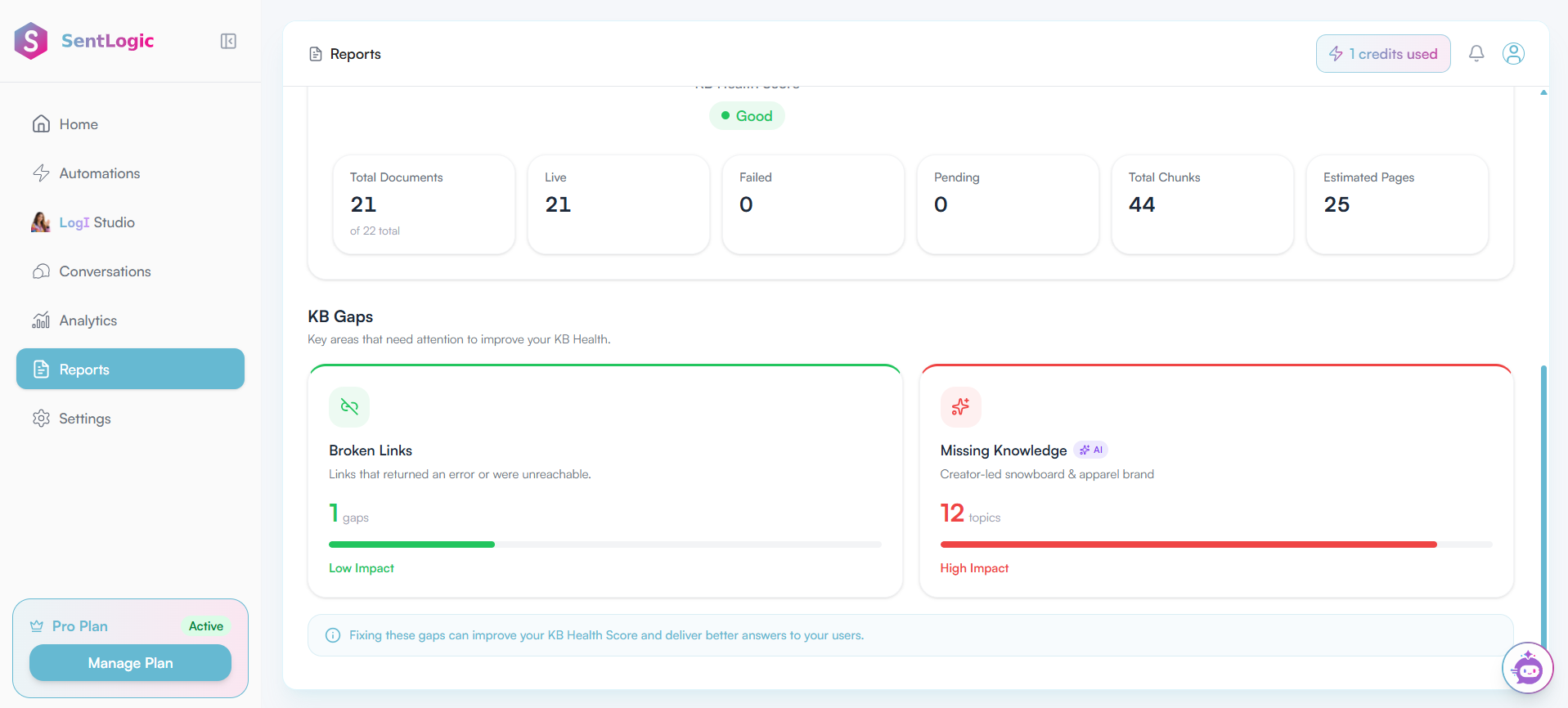
An accurate Knowledge Base is important because the information available to LogI directly affects the answers it can provide in customer DMs. If product details, pricing, availability, shipping information, or store policies are outdated, missing, or conflicting, LogI may not have the right information to respond accurately.
For example, if a product's price or available sizes have changed but the Knowledge Base still contains the older information, a customer could receive an answer that no longer reflects the store's current offering. The same can happen with shipping timelines, return policies, or product availability.
This can create confusion for customers and may require a team member to step into the conversation and provide the correct information. Rather than continuing with an uncertain or unsupported answer, LogI can hand off a conversation when a question or situation requires human attention.
A handoff can be particularly useful when the available Knowledge Base information is not sufficient to answer a customer's question appropriately. It helps ensure that LogI does not try to provide an answer when the necessary business context is unavailable.
Keeping the Knowledge Base accurate and up-to-date therefore matters beyond launch day. The information provided to LogI forms the foundation for how it handles customer questions.
How Does a Knowledge Base Help LogI Handle Customer Questions During a Merch Drop?
Once your Knowledge Base is prepared and uploaded in LogI Studio, LogI can draw on that information to answer customer questions in real time. This gives it the business context it needs without requiring a team member to step in for every message.
Under 30-second replies, 24/7.
During a merch drop, the difference becomes much more noticeable. A launch can bring a large number of customer questions within a few hours. Questions about sizing, product availability, shipping cutoffs, and whether an order went through can all come in at the same time, rather than being spread out over days or weeks.
Without a prepared Knowledge Base, that sudden increase in questions can put more pressure on your team. They may end up answering the same questions repeatedly while also trying to manage the rest of the launch.
With the right information already available, LogI can handle repetitive and predictable questions as they come in. A customer asking about a product's size, whether it is still in stock, or when an order will ship can get the relevant information at the point when they are deciding whether to purchase. This can help reduce unnecessary hesitation and keep the conversation moving.
It also gives your team more room to focus on conversations that actually need human attention, such as an unusual complaint, a bulk order request, or a question that is not covered by the Knowledge Base.
Another benefit is consistency. During a drop, dozens of customers may be asking the same handful of questions at the same time. When LogI is working from the same prepared Knowledge Base, customers can receive consistent information instead of getting slightly different answers depending on which team member happens to respond.
That consistency becomes especially important during a high-traffic launch, when customers are often discussing products and comparing information in real time. Keeping the Knowledge Base accurate gives LogI a consistent source to refer to while handling the increased volume of customer conversations.
Sandbox Testing LogI Before the Drop Goes Live
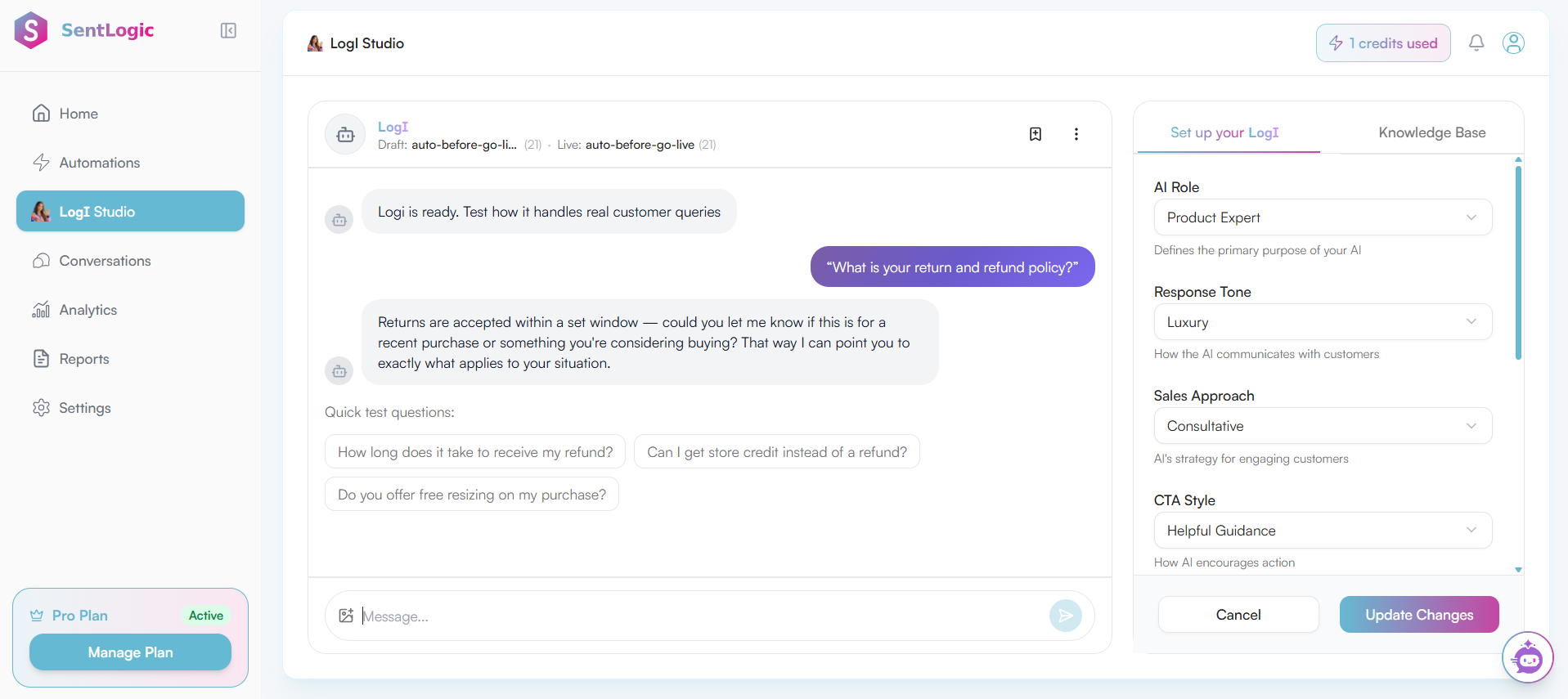
Once your Knowledge Base and LogI settings are ready, the Sandbox gives you a space to test how LogI handles customer conversations before the merch drop goes live. You can ask realistic questions about pricing, sizing, availability, shipping, returns, and other details customers are likely to ask during the drop. While testing, check whether LogI is using the correct information from the Knowledge Base and whether its responses match the communication style you have already set. You can also try questions where information is missing or unclear to spot gaps, incorrect responses, or situations that may need human attention.
Since these tests happen before real customer conversations begin, you have time to make the necessary updates and retest LogI before the launch.
What Else Should Be Ready Apart From the Knowledge Base?
A prepared Knowledge Base is only one part of getting ready for a merch drop. Before launch, you also need to make sure the relevant LogI Studio settings are ready and that the store, team, and fulfillment side can handle the launch.
- Other LogI Studio Settings
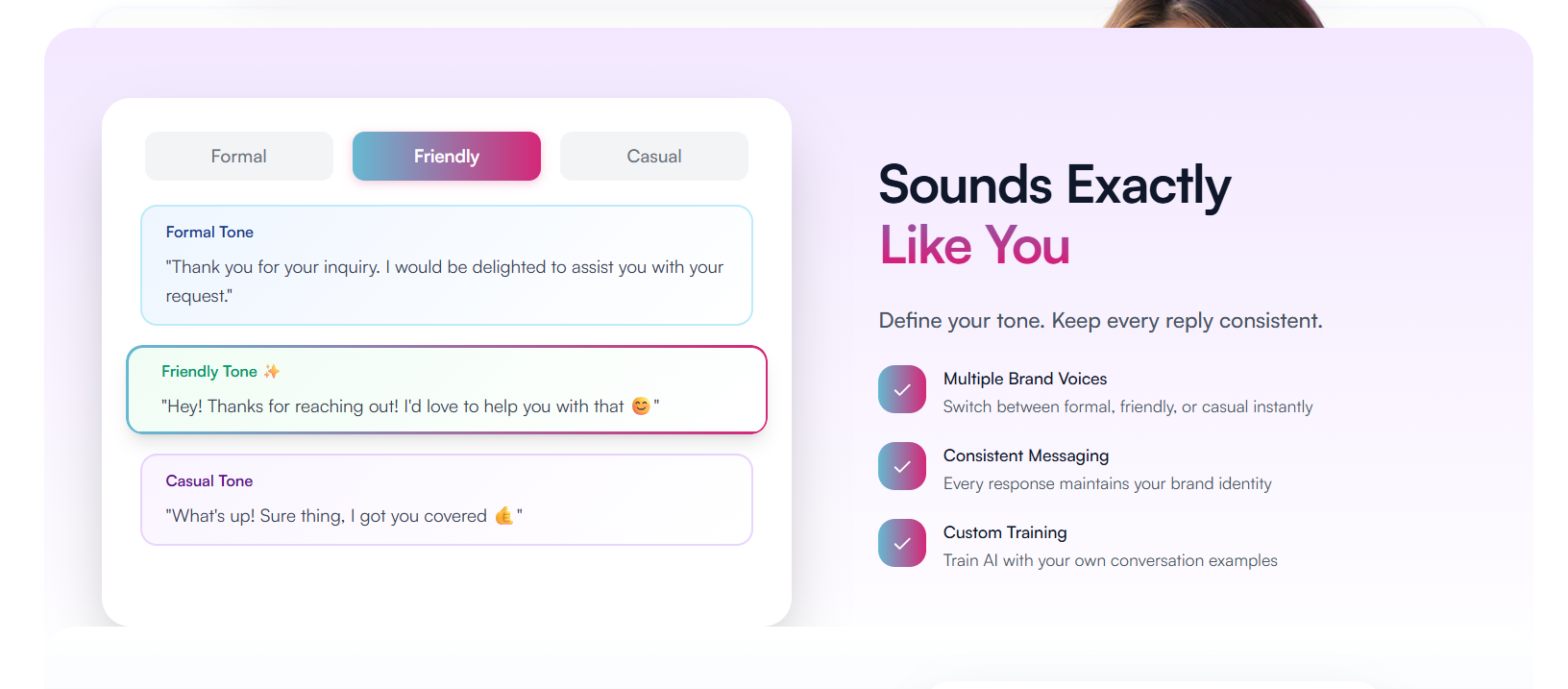
As a final launch check, make sure they reflect the way you want LogI to handle the merch drop, including drop-specific urgency, limited quantities, and sold-out situations, rather than simply carrying over the store's everyday approach.
For the communication style itself, confirm that the AI Role, Response Tone, and Custom Instruction settings are also ready for the launch. These settings shape how LogI communicates, while the Knowledge Base provides the information it uses.
- Non-Product Preparation
There are also a few important launch checks that happen completely outside LogI Studio. These are just as important because having the right customer information available does not fix problems with the actual store or fulfillment process.
Check that Shopify inventory and stock counts are accurate and synced. LogI can only be as accurate as the underlying store data. If stock counts are incorrect in Shopify, having a well-prepared Knowledge Base will not fix that information.
Create and test discount codes or launch promotions. If the merch drop includes discounts, promotional codes, bundles, or other offers, make sure they are created and working before launch. The goal is to avoid discovering that a promotion is broken after customer traffic has already increased.
Confirm team availability during the launch window. Some conversations will still need a human handoff, whether it is an unusual request, a complaint, or a question that LogI cannot answer from the available information. Make sure someone from the team is available during the hours when those conversations are most likely to come in.
Check shipping and fulfillment capacity against expected order volume. The team should be prepared for the number of orders the drop is expected to generate, and the shipping timelines communicated to customers should match what the fulfillment side can realistically deliver.
How to Make Sure Your Knowledge Base Is Live in Settings
Before the merch drop goes live, it is important to make one final check that your Knowledge Base is active and ready to be used by LogI. In SentLogic, you can check the Knowledge Base status through Settings and confirm that the information you prepared is live for the merch store. This helps make sure that the work done before the launch is actually available when LogI starts handling customer DMs.
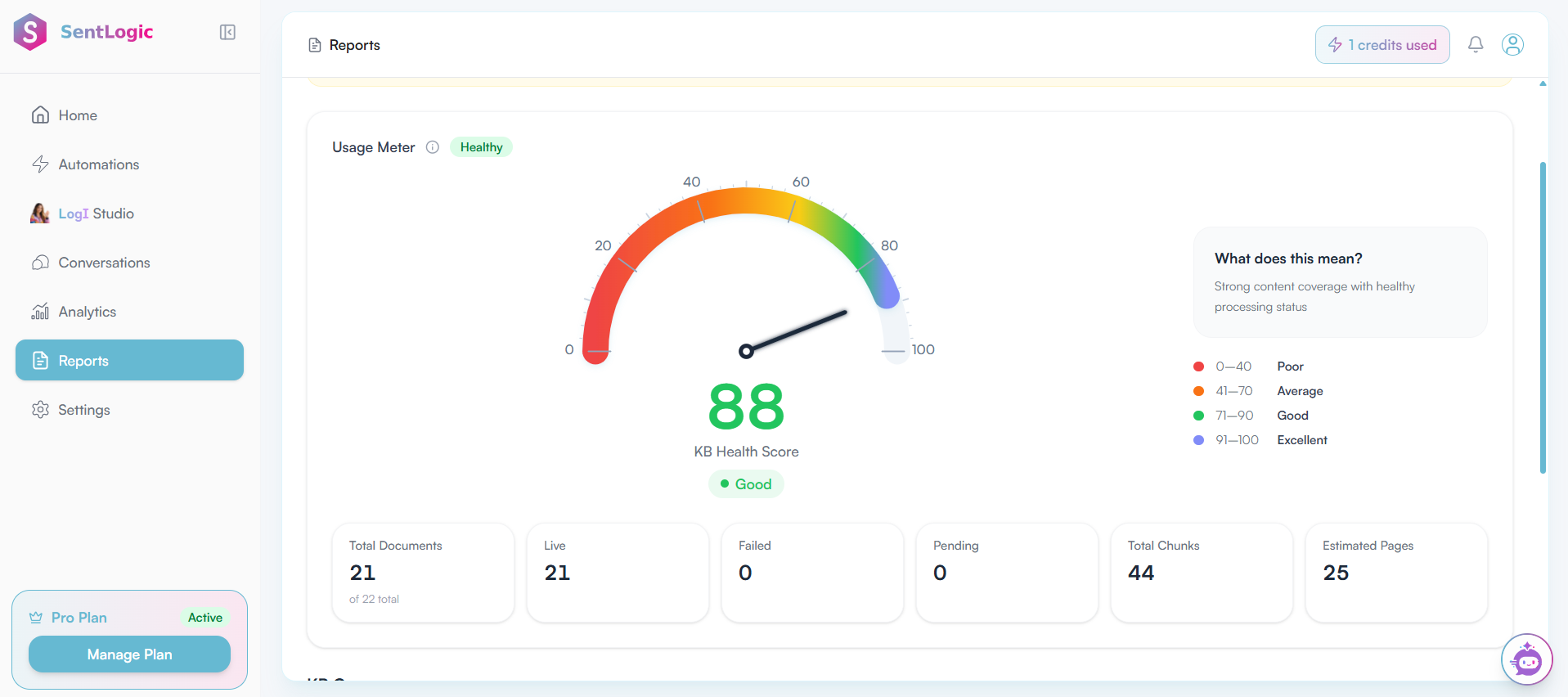
The final check is simple but important. Make sure the latest version of your Knowledge Base is the one that is live, particularly if you made updates to product information, pricing, availability, shipping details, or launch information shortly before the drop.
What Should You Update After the Merch Drop?
The Knowledge Base should not be treated as something you prepare once and never revisit. After the merch drop, review the customer conversations to see which questions came up repeatedly and where the information available to LogI was not enough.
Use those conversations to identify new frequently asked questions, stock or restocking information, shipping updates, product changes, and policy changes that should be added or updated. At the same time, remove temporary launch information that is no longer relevant once the drop has ended.
This gives you a more useful Knowledge Base for the next launch. Instead of preparing from scratch each time, you can build on the questions and gaps identified during previous merch drops and keep the information available to LogI accurate as the store changes.
Conclusion
A successful merch drop is not just about having the products ready. Customers also need the right information at the right time, especially when questions about products, pricing, shipping, returns, availability, and launch details start coming in.
A well-prepared Knowledge Base gives LogI the information it needs to handle these customer questions, while preparing and uploading that information in LogI Studio makes it available for use during the drop. Before launch, check that the Knowledge Base is live, and testing LogI in the Sandbox can help identify missing information or gaps before real customer conversations begin.
It is also important to remember that the Knowledge Base and LogI's communication settings serve different purposes. The Knowledge Base provides the information LogI uses, while the AI Role, Response Tone, Sales Approach, CTA Style, and Custom Instruction in LogI Studio help shape how LogI communicates that information with customers.
The work does not end when the merch drop is over. Reviewing customer conversations can show you what customers asked, what information was missing, and what changed during the launch. You can then update the Knowledge Base with new FAQs, product or policy changes, shipping updates, and other relevant information while removing temporary details that are no longer needed.
The better your Knowledge Base stays, the better prepared both your team and LogI are for the next merch drop.
FAQs
How Does LogI Handle Custom Printed Merch Variants and Dynamic Attributes?
Custom printed products can involve details such as custom text, uploaded artwork, sizes, colors, and other product variations. Make sure these details are clearly available in the information provided to LogI so it has the right context when customers ask about a specific variant.
How Do You Keep Inventory and Product Information Up to Date for LogI?
Inventory and product details should be kept accurate in the underlying store and in the relevant Knowledge Base information. If stock counts, product details, sizes, colors, or pricing change, make sure the information available to LogI is updated as well.
How Does LogI Handle Customers Who Are Ready to Purchase?
When a customer shows strong purchase intent, LogI can use the available product and store information to continue the conversation and guide the customer toward the next step. The exact checkout or purchase flow depends on the setup and capabilities available for the store.
What Happens to LogI Conversations When Store or Knowledge Base Information Is Updated?
Updating store or Knowledge Base information does not mean that every active conversation should be treated as a new conversation. The important thing is to make sure LogI has access to the latest relevant product, pricing, availability, and policy information when handling customer questions.
When a customer shows strong purchase intent, LogI can use the available product and store information to continue the conversation and guide the customer toward the next step. The exact checkout or purchase flow depends on the setup and capabilities available for the store.
What Happens to LogI Conversations When Store or Knowledge Base Information Is Updated?
Updating store or Knowledge Base information does not mean that every active conversation should be treated as a new conversation. The important thing is to make sure LogI has access to the latest relevant product, pricing, availability, and policy information when handling customer questions.
Can Outdated Product Specs or Sizing Information Affect LogI's Responses?
Yes. If outdated product specifications, sizing information, pricing, or availability remain in the information available to LogI, it may affect the answers it provides to customers. Keeping product and Knowledge Base information accurate and up-to-date helps reduce confusion during a merch drop.
Related Articles

No setup fees · Cancel anytimeStop losing leads and
Stop losing leads and
repeating order updates.
Join thousands of brands using LogI to automate, optimize, and scale their Instagram DM sales, effortlessly.
Loved by 800+ sellers · 4.9 ★ on Trustpilot
Start Growing With the LogI